From a plaintext password to genome coordinates — and back.
DNAcrypt-AI maps your password or key to coordinates of randomly sampled DNA sequences. To decrypt, it reconstructs the sequences with FAS2rDNA and interprets them with Covary.
Quick overview
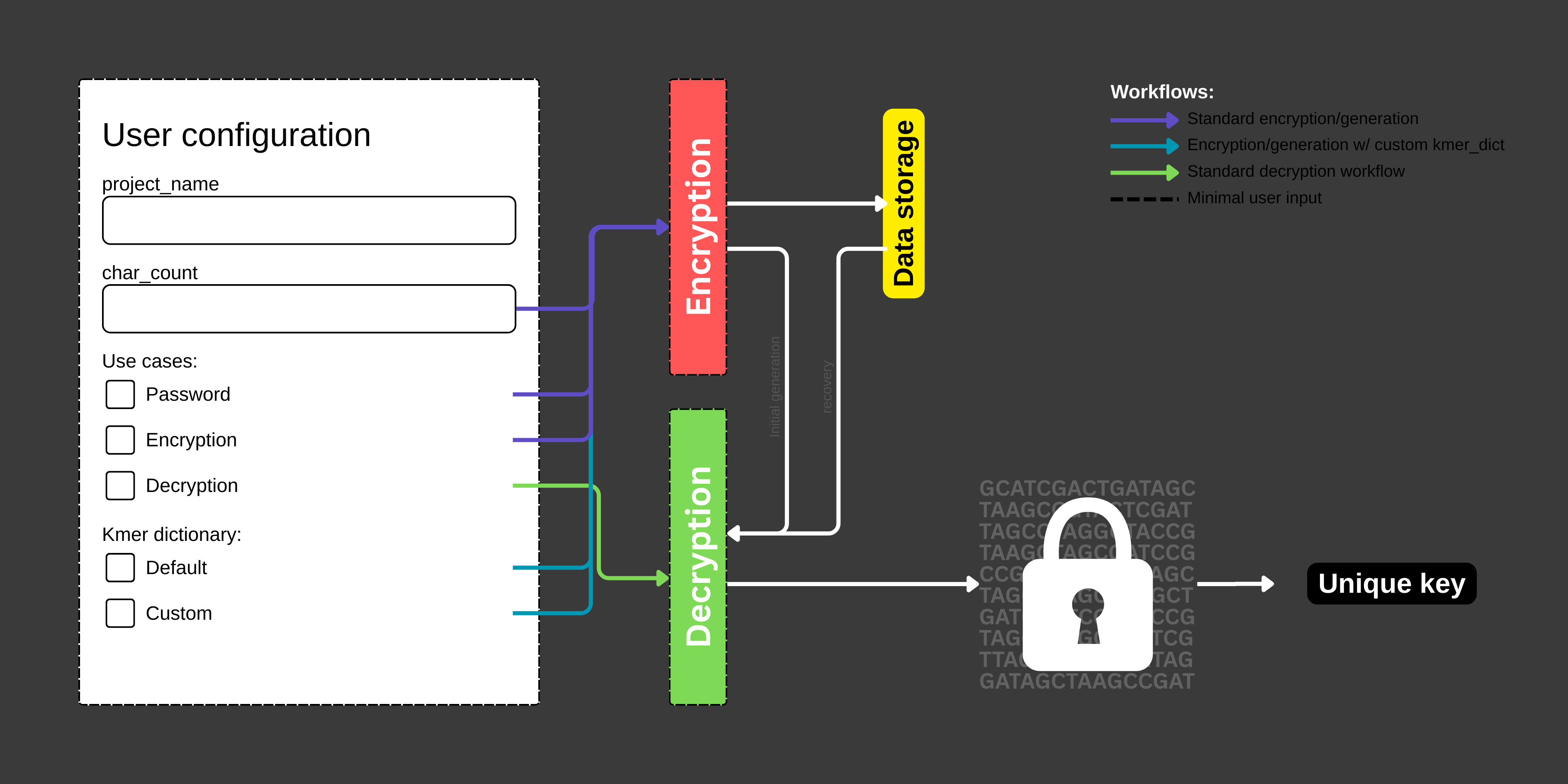
DNAcrypt-AI generates a random password (alphanumeric + symbols) or cryptographic key (alphanumeric only) based on a user-defined length. The generated password or key is encrypted by mapping it to coordinates of randomly sampled, variable-length DNA sequences from the human genome, referenced to the hg19 and hg38 assemblies.
To decrypt the information, DNAcrypt-AI reconstructs the corresponding DNA sequences using a high-throughput sequence reconstitution pipeline (FAS2rDNA) and interprets them with a sequence-informed machine learning model (Covary).
Supported encodings
- Alphanumeric (Passwords & Keys): a–z, A–Z, 0–9
- Symbols (Passwords only): ! @ # $ % ^ & * ( ) - _ + = "
Human genome assemblies
DNAcrypt-AI uses the hg19 and hg38 human genome assemblies as reference spaces for encryption and decryption. These assemblies provide the biological sequence coordinates used to store and retrieve encrypted information. Work is currently underway to expand support to multi-species genome assemblies, which will further increase the genome vocabulary and entropy of DNAcrypt-AI. Suggestions and contributions to improve this capability are welcome.
Encrypting a password or key
- Create a user configuration
- Set
char_countto define the desired length - Select a use case: Password (alphanumeric + symbols) or Encryption (alphanumeric only)
- Set
- Run DNAcrypt-AI — Select Runtime → Run all
- Download and store your encrypted data — These files will be generated:
DNAcrypt_metadata.jsonkmer_dict.json(only if a custom k-mer dictionary is used)
The encrypted files are automatically downloaded. If your browser blocks downloads, you can retrieve them through the File browser manually from /content/ or /content/DNAcrypt/outputs/.
Decrypting a password or key
- Modify the user configuration — set the use case to Decryption
- Run DNAcrypt-AI — Runtime → Run all
- Upload your encrypted data — always upload
DNAcrypt_metadata.json; uploadkmer_dict.jsononly if a custom k-mer dictionary was used during encryption - Wait for decryption to finish — typically 15 minutes or less, depending on genome vocabulary size
Using a custom kmer_dict
Custom kmer_dict (k-mer dictionary) allows users to vary the k-mer-to-character encodings, providing a second layer of encryption or a way to refactor compromised data into new sequences.
During encryption
- In the user configuration: set
char_count, select the use case, choose Custom under K-mer Dictionary - Run DNAcrypt-AI as usual
- Store both
DNAcrypt_metadata.jsonandkmer_dict.jsonfor future recovery
During decryption
- Select Decryption as the use case
- Run DNAcrypt-AI
- Upload both
DNAcrypt_metadata.jsonandkmer_dict.json
Handling and storing encrypted data
Your encrypted files must not be modified. Any loss, alteration, or unintended addition may prevent successful decryption. Tampering with either DNAcrypt_metadata.json or kmer_dict.json will affect recovery of your password or key. File names may be changed, but file contents must remain intact.